You have been managing your retail store really well, as you are a jack of all trades!
But, for how long.
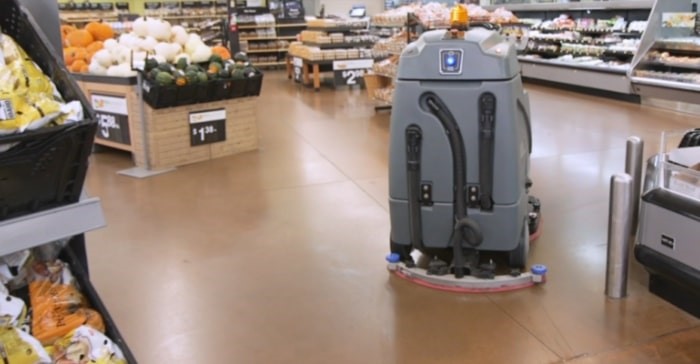
As your business grows, you need to adopt automation in order to make profits in the long run. No matter if you just opened a retail store or you are an online B2C or B2B retailer, automating your tasks and processes can save you tons of hours, money, and other resources.
Owners can use retail store automation tools to automate marketing, backend & frontend tasks, drop shipping, tax calculation, customer service, warehouse operations, and a lot more.
So, further let’s understand how retail store automation can be beneficial for your business and what tools you can use for automating different functions of your retail store.
What is retail store management?
Retail store management means handling all the functions in a retail store that include managing inventory to meet customers’ needs, keeping a record of outgoing and incoming items, etc. In addition to this, store management also involves keeping track of returned, damaged and defective goods.
All this may sound easy, but when it comes to large stores or a chain of retail stores, it can create chaos for the store manager and staff.
Here, automation can save you.
You can put your repetitive and monotonous tasks on autopilot using automation technologies like billing software for retailers. As a result, your staff can put their effort into more strategic and quality-driven tasks. In automation, you define certain parameters that decide when a specific action needs to take place, when this happens, the process automatically moves forward.
For instance, while automating your retail store, you can set a parameter like minimum inventory count, and when that is met, you will be notified to fill your stock. This saves the time and effort of manually checking inventory.
Why Is Retail Store Automation Important
Undoubtedly, automation saves time and human resources, prevents human errors, etc. But it also has some additional hidden benefits like it can also help your business to drive more conversion and offer a better customer experience.
Let’s understand in detail the benefits of retail store automation through retail management software.
Retail store automation can help businesses save money and human resources spent in performing repetitive tasks. By implementing different free tools to automate your retail store, you can cut down costs on endless paperwork and eventually reduce your turnover rates and chances of human errors.
Retail store automation tools increase your operational efficiency, even when your employees are not physically working or present. For example, you can use an AI-based chatbot to keep your business operations running 24×7 and speed up the tasks. Or implement a payroll automation tool to minimize human intervention and errors.
- Better Conversions Than Ever
Retail stores can utilize free tools like marketing automation software to send personalized emails and push notifications to a targeted audience. This increases your chances of conversions and boosts your overall sales.
- Enhanced Customer Experience
You want to be available for your customers, even in different time zones. It is only possible when your retail business uses an AI-based chatbot that can be available 24/7 for your customers. It ensures that you attend to your customers with the right answers or transfer it to a human customer rep when necessary.
- Protect Your Business Against Fraud
Yes, you heard that right. To safeguard your business against fraud you can add an extra layer of security like identity verification for large or high-risk orders, using retail store management software. Your parameters for high-risk orders can be determined by different factors such as the value, geographical location, duration, or the nature of the order.
5 Free Software & Tools You Need for Automation
Let’s understand how different automation tools for retail businesses streamline different operations.
Sortly: Inventory Management Tool
Sortly enables retail businesses to simply manage supplies, inventory, and everything else in just a click. It gives a 360-degree view of the inventory in your retail store and allows you to access, track, and add items, as and when required. It saves your time spent in manually checking and counting the inventory, while keeping it organized by name, type, date, etc.
What Can You Do with an Inventory Management Tool?
- Enable in-built QR code and barcode scanning
- Visually track inventory with high quality images
- Receive alerts when you get low on stock
- Get insights for budgeting, auditing, and forecasting from real time reports
- Update all your teams across locations in real time with cloud syncing
Marketing Hub by HubSpot: Marketing Automation Tool
A marketing automation tool helps retail stores to attract more consumers and convert them into quality leads. In addition to this, Marketing Hub by HubSpot, also helps retail businesses to create personalized marketing communication to run targeted campaigns. For better leads, retail stores can also run timely Google ads with an attractive CTA using the marketing automation software.
What Can You Do with a Marketing Automation Tool?
- Create free email marketing campaigns with drag and drop editor
- Build free landing pages to generate leads
- Manage your social media channels to understand your audience better
- Access in-built reports, dashboards, and analytics to understand the performance of your marketing campaigns.
ChatBot: Customer Service Automation Tool
ChatBot is an AI tool that automates your responses to customers, making your brand available for them 24×7. This customer service software can help you manage unlimited customer inquiries in real time. It improves your productivity and workflow while helping you to resolve general customer enquiries in a smarter and faster way.
What Can You Do with a Customer Service Automation Tool?
- Build engaging conversations with drag & drop chat blocks
- Access customizable pre-set chat templates
- Analyze ChatBot reports to measure and improve performance
- Integrate ChatBot with multiple platforms such as Messenger, Slack, your own website, etc.
- Automate the lead qualification process with pre-set metrics
PayFit: Payroll Automation Tool
Payroll automation software like PayFit allows retail store owners to automate payroll processing and eliminate bulky spreadsheets and human errors. It automatically syncs accounting, HR, and pension data in real time to calculate payroll, after all the deductions and bonuses.
What can you do with the payroll automation tool?
- Generate automated employee salary slips
- Manage leaves, expenses, reimbursements, etc., to calculate payroll efficiently
- Integrate multiple payment solutions for faster payments
- Facilitate deductions like insurance, vouchers, memberships, company shares, etc.
Avalara: Taxes Automation Tool
A taxes automation software can help you simplify taxes for your retail store. It ensures that your business faces minimum to no compliance risk. In fact, it can even help you trade internationally with cross border tariffs, custom duties, import taxes, and more.
What Can You Do with a Taxes Automation Tool
- Calculate accurate taxes with automated classification of HS code
- Be aware of the customs duties to avoid any reverse shipping or related charges
- Overcome any global or domestic compliance challenges
- Access in-built tariff code classification with combined human expertise and AI
- Offer large product catalogues to your consumers with international shipping
- Do right pricing after accurate tax calculation
Conclusion
You want your staff and process to make the most out of automation. So, we recommend you to start little, with small processes that can be easily replaced by technology. These may include payroll automation or inventory management and slowly automate the complete retail store. Along with this, you will also need to give your employees enough time to train and get adjusted to new technology.