Tech
Key Tips for Creating a Successful WordPress Website
Published
6 hours agoon
By
Author
WordPress is a powerful and widely used content management system (CMS) that began as a simple blogging tool but has since grown into a robust platform capable of handling nearly any type of website. From personal blogs and professional portfolios to online stores and educational platforms, WordPress offers the flexibility to create and manage diverse digital content. As of December 2024, it powered over 22% of the top one million websites globally, highlighting its widespread adoption and reliability. The fact that WordPress is free and open-source makes it accessible to beginners and professionals alike, enabling users to build fully functional websites without needing to start from scratch.
Built using the PHP programming language and supported by MySQL or MariaDB databases, WordPress features a highly customizable system through its plugin architecture and themes, allowing users to tailor their sites to specific needs and styles. Themes control the visual appearance, while plugins add functionality, making it possible to integrate everything from SEO tools to e-commerce systems. To run properly, WordPress must be installed on a web server—either via a hosting provider or locally on a personal computer. Thanks to its user-friendly interface and massive community support, WordPress continues to be a go-to choice for individuals and businesses aiming to establish a strong online presence.
What Is WordPress?
WordPress is known as one of the most user-friendly and widely used platforms for building websites and blogs. It powers more than 43.6% of all websites on the internet, making it the backbone behind nearly half of the web. Whether you’re setting up a personal blog, a business website, or an online store, WordPress provides the flexibility and tools to make the process simple and effective. Its widespread use is a strong testament to how beginner-friendly and reliable the platform is for users around the world.
From a technical perspective, WordPress is an open-source content management system (CMS) operating under the GPLv2 license, allowing users to freely use, customize, and distribute the software. A CMS like WordPress allows users to control and manage website content—like text, images, and pages—without needing any coding knowledge. This opens the door for anyone, regardless of technical skill, to create a fully functional and attractive website. With WordPress, you don’t need to be a developer to build something professional and engaging.
Different Kinds of Websites You Can Create Using WordPress

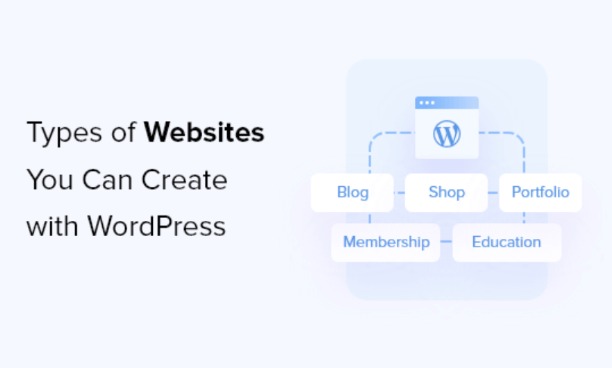
While WordPress originally started as a blogging platform, it has grown into a powerful tool capable of creating almost any type of website. Thanks to major updates in its core software and the availability of thousands of plugins and themes, WordPress now serves as the foundation for countless websites across different industries. Whether you’re an individual sharing ideas or a business reaching customers, WordPress provides the flexibility and features to support your goals.
Nowadays, WordPress allows you to create many different types of websites. These include professional business websites, eCommerce stores using tools like WooCommerce, personal blogs, digital portfolios, and even online resumes. In addition, it’s commonly used to create interactive communities like forums, social networks, and membership-based websites. With WordPress, the possibilities are nearly endless—it adapts to your vision, whether you’re building something simple or highly complex.
Key Features Of WordPress: A Simplified Breakdown
- 1. WordPress Themes
- Themes let users completely change how a WordPress site looks and functions without altering any core code.
- You can install themes directly from the dashboard under the “Appearance” menu or upload them manually.
- Themes come in two types: free (found in the official WordPress repository) and premium (available from developers or theme marketplaces).
- Users can also create their own custom themes or child themes to make specific style or layout changes.
- 2. WordPress Plugins
- Plugins expand the features of a WordPress website, allowing for added functionality like SEO tools, contact forms, and online stores.
- As of now, there are tens of thousands of free plugins available from the WordPress plugin directory, with many more premium ones sold by developers.
- Some plugins may not work if not updated regularly, and WordPress flags those that haven’t been tested with recent versions.
- Developers use action hooks and filter hooks to build plugins, giving them flexibility to shape WordPress into complex applications or services.
- 3. Mobile Compatibility
- WordPress offers free apps for Android, iOS, and other platforms, helping users manage content, post updates, and reply to comments while on the move.
- These mobile apps are designed by Automattic and make it easier for users to interact with their sites from anywhere.
- 4. Accessibility and Usability
- WordPress follows strict accessibility guidelines (WCAG 2.0 Level AA) to ensure that its platform is usable by people with various disabilities.
- It supports features like smart text formatting, clean URLs, and tagging to enhance both user experience and SEO.
- 5. Multi-site Capability
- WordPress Multisite enables users to operate and oversee several websites using just one WordPress installation.
- This feature is ideal for businesses, schools, or organizations that need to control several sites at once through one dashboard.
Why WordPress Is the Leading Platform for Website Creation

WordPress has gained widespread recognition as the top platform for website creation, and it’s easy to see why. Whether you want to start a personal blog, set up an online shop, or build a professional business website, WordPress provides the versatility and features needed to bring your ideas to life. Its user-friendly interface, vast plugin library, and customizable themes make it accessible for beginners while still offering depth for developers who want more control.
Understanding the difference between WordPress.com and self-hosted WordPress.org is crucial. WordPress.com takes care of hosting and maintenance for you, making it easier to get started, while self-hosted WordPress.org offers complete control over your website and content, allowing for greater customization and flexibility. With WordPress.org, you gain the freedom to install any plugin, customize themes fully, and take advantage of the broader WordPress community. For most users who want flexibility and ownership, self-hosted WordPress.org is the better choice.
FAQs About WordPress
- 1. What is WordPress used for?
- • WordPress is a popular content management system used to create all types of websites, including blogs, business sites, portfolios, and online stores.
- 2. Is WordPress free to use?
- Yes, WordPress.org is free and open-source. However, you’ll need to pay for hosting and a domain name to launch a live website.
- 3. Do I need coding skills to use WordPress?
- No, you don’t need to know how to code. WordPress offers user-friendly tools, themes, and plugins to build and manage your site easily.
- 4. Can I sell products on my WordPress website?
- Absolutely. With plugins like WooCommerce, you can turn your WordPress site into a full-featured eCommerce store.
- 5. What’s the difference between WordPress.com and WordPress.org?
- WordPress.com is a hosted platform with some limitations, while WordPress.org is self-hosted and gives you complete control over your website.
Conclusion
WordPress continues to dominate the web development world because of its flexibility, ease of use, and powerful features. Whether you’re a beginner creating a personal blog or a business owner launching an online store, WordPress offers tools and plugins that make website creation simple and effective. Its open-source nature allows for endless customization, supported by a large global community that constantly develops new themes, plugins, and updates.
Choosing WordPress means gaining control over your content and the freedom to design a site that meets your goals. From SEO optimization to mobile responsiveness, WordPress has built-in advantages that help users grow and manage their online presence efficiently. As more people turn to digital solutions, WordPress remains a trusted and smart choice for building professional websites.
You may like
Tech
Why Outlook is a Powerful Tool for Email Marketers
Published
3 days agoon
April 11, 2026By
Author
Why Outlook is a Powerful Tool for Email Marketers
In the ever-evolving world of digital marketing, email remains one of the most effective channels for reaching and engaging audiences. For email marketers, having the right tools can make the difference between a good campaign and a great one. Microsoft Outlook, particularly on the Windows platform, is a powerhouse for managing, automating, and optimizing email marketing efforts.
This article explores why Outlook is a crucial tool for email marketers and how it can streamline tasks, improve efficiency, and maximize results. Whether you’re new to email marketing or a seasoned pro, understanding how Outlook can elevate your strategy is essential.
1. Seamless Integration with Windows Ecosystem
Outlook is built to integrate seamlessly with the Windows operating system, offering email marketers a smooth and efficient experience. This tight integration means faster performance, better compatibility with other Microsoft tools, and streamlined workflows.
Key Advantages of Windows Integration:
- Enhanced Performance: Running Outlook on Windows ensures faster load times and seamless operation, even with large email lists.
- Cross-App Connectivity: Easily connect with Microsoft apps like Excel, Word, and Teams to manage email lists, create templates, and collaborate with team members.
- Customizable Features: Personalize your Outlook interface, notifications, and workflows to suit your marketing needs.
- Cloud Integration: OneDrive and SharePoint allow for secure file sharing and collaboration directly from Outlook.
For marketers looking for an all-in-one solution, the Windows ecosystem combined with Outlook provides unmatched versatility.
2. Personalization at Scale
In 2025, personalization is no longer optional—it’s a necessity for effective email marketing. Outlook enables marketers to personalize their communications, ensuring each recipient feels valued and engaged.
Personalization Features in Outlook:
- Dynamic Fields: Incorporate recipient-specific details, such as names or company names, using Mail Merge.
- Segmented Lists: Organize contacts into groups based on demographics, purchase behavior, or engagement levels.
- Custom Templates: Create and save templates tailored to specific campaigns, reducing preparation time for future emails.
By combining these features with its mass email capabilities, marketers can learn how to send mass email in Outlook while maintaining a personal touch.
3. Effortless Mass Email Management
One of Outlook’s standout features is its ability to manage large volumes of emails efficiently. For email marketers, this capability is critical when dealing with extensive contact lists and high-frequency campaigns.
How to Send Mass Email in Outlook:
Outlook offers several options for sending bulk emails while maintaining a professional and personalized touch:
- Mail Merge: Use Microsoft Word’s Mail Merge feature to send customized emails to a large audience. This method allows you to address recipients by name and include personalized details.
- Distribution Lists: Create distribution groups in Outlook to easily manage and email specific segments of your audience.
- Third-Party Add-Ons: Integrate tools to enhance Outlook’s mass email capabilities.
These features simplify the process of reaching large audiences, saving time and ensuring consistency in your messaging.
4. Advanced Scheduling and Automation
Email timing plays a significant role in campaign success. Outlook’s scheduling and automation features ensure emails are sent at the optimal time for maximum impact.
Automation and Scheduling Tools:
- Email Scheduling: Plan your emails to be sent at specific times, ensuring they land in recipients’ inboxes when engagement is likely to be highest.
- Recurring Emails: Automate repetitive tasks like weekly newsletters or monthly updates.
- Rules and Filters: Automatically sort, flag, or forward incoming emails based on predefined criteria.
These tools allow marketers to focus on strategy and creativity while Outlook handles repetitive tasks efficiently.
5. Centralized Communication Hub
Outlook on Windows serves as a centralized hub for managing all email communications, making it easy to stay organized and maintain control over campaigns.
Why Centralized Management Matters:
- Unified Inbox: Consolidate emails from multiple accounts into one inbox for easy access.
- Folder Organization: Sort emails into folders by campaign, client, or topic for quick retrieval.
- Advanced Search: Quickly find specific emails or attachments using Outlook’s robust search capabilities.
This centralized approach streamlines email marketing workflows and ensures no important communication is missed.
6. Robust Security Features
Email security is a top priority for marketers handling sensitive customer data. Outlook provides advanced security features to protect both the marketer and their audience.
Security Features in Outlook:
- Email Encryption: Safeguard sensitive information by encrypting emails.
- Spam and Phishing Filters: Reduce the risk of cyberattacks with built-in filtering tools.
- Two-Factor Authentication (2FA): Add an extra layer of protection to your account.
- Data Loss Prevention (DLP): Prevent unauthorized sharing of sensitive information.
For email marketers, these features ensure compliance with data protection regulations while maintaining audience trust.
7. Analytics and Tracking
While Outlook isn’t a dedicated analytics platform, it offers tools and integrations that help marketers measure email performance and refine their strategies.
Tracking and Analytics Features:
- Read Receipts: Track when recipients open your emails.
- Delivery Reports: Confirm successful delivery of messages to recipients.
- Add-Ons for Advanced Analytics: Integrate with tools like Google Analytics or third-party apps to monitor campaign performance.
These capabilities help marketers understand how their campaigns are performing and make data-driven decisions to improve results.
8. Integration with Third-Party Tools
Outlook’s compatibility with third-party tools expands its functionality, making it an even more powerful platform for email marketers.
Popular Integrations:
- Mailchimp: Sync your Outlook contacts with Mailchimp to manage email campaigns and track performance.
- HubSpot: Use HubSpot’s Outlook add-in to log emails, track opens, and manage CRM data directly within Outlook.
- Salesforce: Integrate Salesforce to streamline lead tracking and customer relationship management.
These integrations simplify complex workflows, allowing marketers to focus on creating impactful campaigns.
9. Cross-Device Accessibility
In today’s hybrid work environment, email marketers need tools that work seamlessly across devices. Outlook on Windows syncs effortlessly with mobile and web apps, ensuring consistent access.
Benefits of Cross-Device Synchronization:
- Real-Time Updates: Changes made on one device reflect instantly across all synced devices.
- Offline Access: Compose and organize emails offline, with updates syncing once reconnected.
- Mobile-Friendly Interface: Manage campaigns on the go using the Outlook mobile app.
This flexibility ensures that marketers can stay productive no matter where they work.
10. Scalability for Growing Campaigns
As businesses grow, their email marketing needs evolve. Outlook on Windows is built to handle the demands of expanding campaigns without compromising performance.
Scalability Features:
- Large Storage Capacity: Manage extensive email histories without worrying about space.
- Custom Rules and Workflows: Adapt Outlook’s features to support more complex campaigns.
- Enterprise Solutions: Use Microsoft 365 for additional collaboration and scalability options.
Whether managing a small startup or a large enterprise, Outlook provides the tools needed to scale effectively.
Microsoft Outlook on Windows is an indispensable tool for email marketers. From its seamless integration with the Windows ecosystem and centralized communication hub to its advanced scheduling, automation, and personalization features, Outlook offers everything marketers need to execute successful campaigns. Its robust security measures, compatibility with third-party tools, and scalability make it a versatile solution for businesses of all sizes.
For marketers wondering how to send mass email in Outlook, the platform provides intuitive tools like Mail Merge, distribution lists, and add-ons that simplify the process while maintaining personalization. By leveraging Outlook’s capabilities, email marketers can save time, improve efficiency, and achieve measurable results.
If you’re ready to elevate your email marketing strategy, consider making Outlook on Windows your go-to platform—it’s a powerful ally in the world of digital marketing.
In the ever-evolving world of digital marketing, email remains one of the most effective channels for reaching and engaging audiences. For email marketers, having the right tools can make the difference between a good campaign and a great one. Microsoft Outlook, particularly on the Windows platform, is a powerhouse for managing, automating, and optimizing email marketing efforts.
This article explores why Outlook is a crucial tool for email marketers and how it can streamline tasks, improve efficiency, and maximize results. Whether you’re new to email marketing or a seasoned pro, understanding how Outlook can elevate your strategy is essential.
- 1. Seamless Integration with Windows Ecosystem
Outlook is built to integrate seamlessly with the Windows operating system, offering email marketers a smooth and efficient experience. This tight integration means faster performance, better compatibility with other Microsoft tools, and streamlined workflows.
Key Advantages of Windows Integration:
- Enhanced Performance: Running Outlook on Windows ensures faster load times and seamless operation, even with large email lists.
- Cross-App Connectivity: Easily connect with Microsoft apps like Excel, Word, and Teams to manage email lists, create templates, and collaborate with team members.
- Customizable Features: Personalize your Outlook interface, notifications, and workflows to suit your marketing needs.
- Cloud Integration: OneDrive and SharePoint allow for secure file sharing and collaboration directly from Outlook.
For marketers looking for an all-in-one solution, the Windows ecosystem combined with Outlook provides unmatched versatility.
- 2. Personalization at Scale
In 2025, personalization is no longer optional—it’s a necessity for effective email marketing. Outlook enables marketers to personalize their communications, ensuring each recipient feels valued and engaged.
Personalization Features in Outlook:
- Dynamic Fields: Incorporate recipient-specific details, such as names or company names, using Mail Merge.
- Segmented Lists: Organize contacts into groups based on demographics, purchase behavior, or engagement levels.
- Custom Templates: Create and save templates tailored to specific campaigns, reducing preparation time for future emails.
By combining these features with its mass email capabilities, marketers can learn how to send mass email in Outlook while maintaining a personal touch.
- 3. Effortless Mass Email Management
One of Outlook’s standout features is its ability to manage large volumes of emails efficiently. For email marketers, this capability is critical when dealing with extensive contact lists and high-frequency campaigns.
How to Send Mass Email in Outlook:
Outlook offers several options for sending bulk emails while maintaining a professional and personalized touch:
- Mail Merge: Use Microsoft Word’s Mail Merge feature to send customized emails to a large audience. This method allows you to address recipients by name and include personalized details.
- Distribution Lists: Create distribution groups in Outlook to easily manage and email specific segments of your audience.
- Third-Party Add-Ons: Integrate tools to enhance Outlook’s mass email capabilities.
These features simplify the process of reaching large audiences, saving time and ensuring consistency in your messaging.
- 4. Advanced Scheduling and Automation
Email timing plays a significant role in campaign success. Outlook’s scheduling and automation features ensure emails are sent at the optimal time for maximum impact.
Automation and Scheduling Tools:
- Email Scheduling: Plan your emails to be sent at specific times, ensuring they land in recipients’ inboxes when engagement is likely to be highest.
- Recurring Emails: Automate repetitive tasks like weekly newsletters or monthly updates.
- Rules and Filters: Automatically sort, flag, or forward incoming emails based on predefined criteria.
These tools allow marketers to focus on strategy and creativity while Outlook handles repetitive tasks efficiently.
- 5. Centralized Communication Hub
Outlook on Windows serves as a centralized hub for managing all email communications, making it easy to stay organized and maintain control over campaigns.
Why Centralized Management Matters:
- Unified Inbox: Consolidate emails from multiple accounts into one inbox for easy access.
- Folder Organization: Sort emails into folders by campaign, client, or topic for quick retrieval.
- Advanced Search: Quickly find specific emails or attachments using Outlook’s robust search capabilities.
This centralized approach streamlines email marketing workflows and ensures no important communication is missed.
- 6. Robust Security Features
Email security is a top priority for marketers handling sensitive customer data. Outlook provides advanced security features to protect both the marketer and their audience.
Security Features in Outlook:
- Email Encryption: Safeguard sensitive information by encrypting emails.
- Spam and Phishing Filters: Reduce the risk of cyberattacks with built-in filtering tools.
- Two-Factor Authentication (2FA): Add an extra layer of protection to your account.
- Data Loss Prevention (DLP): Prevent unauthorized sharing of sensitive information.
For email marketers, these features ensure compliance with data protection regulations while maintaining audience trust.
- 7. Analytics and Tracking
While Outlook isn’t a dedicated analytics platform, it offers tools and integrations that help marketers measure email performance and refine their strategies.
Tracking and Analytics Features:
- Read Receipts: Track when recipients open your emails.
- Delivery Reports: Confirm successful delivery of messages to recipients.
- Add-Ons for Advanced Analytics: Integrate with tools like Google Analytics or third-party apps to monitor campaign performance.
These capabilities help marketers understand how their campaigns are performing and make data-driven decisions to improve results.
- 8. Integration with Third-Party Tools
Outlook’s compatibility with third-party tools expands its functionality, making it an even more powerful platform for email marketers.
Popular Integrations:
- Mailchimp: Sync your Outlook contacts with Mailchimp to manage email campaigns and track performance.
- HubSpot: Use HubSpot’s Outlook add-in to log emails, track opens, and manage CRM data directly within Outlook.
- Salesforce: Integrate Salesforce to streamline lead tracking and customer relationship management.
These integrations simplify complex workflows, allowing marketers to focus on creating impactful campaigns.
- 9. Cross-Device Accessibility
In today’s hybrid work environment, email marketers need tools that work seamlessly across devices. Outlook on Windows syncs effortlessly with mobile and web apps, ensuring consistent access.
Benefits of Cross-Device Synchronization:
- Real-Time Updates: Changes made on one device reflect instantly across all synced devices.
- Offline Access: Compose and organize emails offline, with updates syncing once reconnected.
- Mobile-Friendly Interface: Manage campaigns on the go using the Outlook mobile app.
This flexibility ensures that marketers can stay productive no matter where they work.
- 10. Scalability for Growing Campaigns
As businesses grow, their email marketing needs evolve. Outlook on Windows is built to handle the demands of expanding campaigns without compromising performance.
Scalability Features:
- Large Storage Capacity: Manage extensive email histories without worrying about space.
- Custom Rules and Workflows: Adapt Outlook’s features to support more complex campaigns.
- Enterprise Solutions: Use Microsoft 365 for additional collaboration and scalability options.
Whether managing a small startup or a large enterprise, Outlook provides the tools needed to scale effectively.
Microsoft Outlook on Windows is an indispensable tool for email marketers. From its seamless integration with the Windows ecosystem and centralized communication hub to its advanced scheduling, automation, and personalization features, Outlook offers everything marketers need to execute successful campaigns. Its robust security measures, compatibility with third-party tools, and scalability make it a versatile solution for businesses of all sizes.
For marketers wondering how to send mass email in Outlook, the platform provides intuitive tools like Mail Merge, distribution lists, and add-ons that simplify the process while maintaining personalization. By leveraging Outlook’s capabilities, email marketers can save time, improve efficiency, and achieve measurable results.
If you’re ready to elevate your email marketing strategy, consider making Outlook on Windows your go-to platform—it’s a powerful ally in the world of digital marketing.
Gadget
Jira Vs Trello: Which Is a Better Project Management Tool
Published
5 days agoon
April 9, 2026
The global workspace continues to shift toward a remote work culture. It is becoming more crucial than ever to manage work projects and communication from one central area. Whether you want to design a project, assign responsibilities to team members, document workflows, or assess the project’s status, project management software will make your tasks easier.
Of course, there are several software options available in the market that offer features related to project tracking. However, Trello and Jira, are two of the most widely used project management tools globally. In this blog, we will discuss differences between the two and figure out which is a better project management tool depending on your use case. Let’s get started.
Trello and Jira: Origin story
Both Trello and Jira are developed by the Australian software company named Atlassian. It is understandable that both software programs share many similar features and characteristics, given they are published by the same company. However, they both have unique functionalities. Let us compare their features – Jira vs Trello.
Overall Differences: Trello Vs Jira
Both Trello and Jira provide an excellent task management system, but they each have particular advantages. The main distinction between the two is that Jira includes Kanban, Scrum, and sprint boards while Trello only offers Kanban boards.
Visual task tracking for projects is achieved using Scrum and Kanban boards. Scrum focuses on completing small amounts of work in brief periods known as “sprints.” Teams working on software development frequently adopt Scrum and that is why they prefer Jira software.
Kanban boards, in contrast, are intended to aid with process visualization. It is a more flexible approach that readily adjusts to the shifting priorities of the project. Businesses that need to manage multiple projects simultaneously often prefer Trello for its amazing kanban functionalities.
Round one verdict: Jira has a steeper learning curve as compared to Trello and is less simple to use because it offers more complex customization possibilities. Trello is thus a fantastic choice for companies seeking an all-in-one project management software suite.
Trello Vs Jira: Pricing & Features
Now, let us shift our focus to the features offered by each of these software programs based on their differently priced versions:
Trello Pricing
Businesses that require a general-purpose project management tool might consider Trello. It is effective for many different undertakings, including editorial calendar planning, product development, marketing campaigns, and event planning.
Trello Free Version
The free basic plan of Trello offers unlimited team collaboration on team boards, unlimited cards (or tasks), unlimited power-pps, and integration with a variety of third-party apps and services.
For enterprises that require a productivity tool to schedule tasks and allow team members to collaborate on projects, the free edition is enough to start with. Its paid editions offer additional reporting capabilities with access to real-time analytics, Google Workspace sign-on. Also, Trello allows you to sync data with business applications like GitHub, Slack, and Salesforce.
Trello Paid Versions
The monthly cost of Trello’s Standard, Premium, and Enterprise plans ranges from $5 to $17.50. Prices are determined on a “per user” model and the bill is done annually. Although you have the option for the monthly bill option, for that scenario, the billing amount would rise.
Jira Pricing
Now, let’s discuss Trello’s sibling, Jira. Jira originally started as a project management application for computer programmers. The software provides a variety of tools that enable issue tracking and give users the option to adopt agile and sprint methodologies for their projects.
To clarify, Jira isn’t a software program meant for all types of projects. It is best suited for teams working on products that require heavy testing and debugging.
Jira Free Version
Jira’s free plan is best suited for smaller teams and uncomplicated projects. It allows users with the basic roadmap access, supports up to 10 users, and provides 2 GB of storage. However, there’s no dedicated customer support team available for free plan users. However, for the paid version, you get access to some incredible features that aid in your project management process.
Jira Pricing: Paid Versions
Jira’s Standard plan starts at $7.50 per user per month, which allows up to 20,000 users and comes with dedicated customer support. The software’s Premium plan comes at $14.50 per user a month, which has numerous in-built project automation features, unlimited storage, and advanced administration insights. Jira also has an Enterprise plan. However, organizations need to contact the customer support team to receive a quotation.
Round two verdict: Again, based on the pricing-based features, Trello clearly stands out as a winner, given that it offers some of the most amazing features without any cost. On the other hand, Jira’s free version comes with limited features and it is not suitable for managing multi-purpose projects.
Our Final Verdict
There’s no doubt that Jira is a robust software suite that offers some great functionality for businesses that require sophisticated features. However, that being said, the general-purpose architecture of Trello and the plethora of exciting features (even with the free version) make it a go-to option for organizations with less complicated project management workflows.
In simpler words, unless your team is expanding at a significant speed or predominantly works around software development projects and carries out sophisticated operations, Trello is for you.
You have been managing your retail store really well, as you are a jack of all trades!
But, for how long.
As your business grows, you need to adopt automation in order to make profits in the long run. No matter if you just opened a retail store or you are an online B2C or B2B retailer, automating your tasks and processes can save you tons of hours, money, and other resources.
Owners can use retail store automation tools to automate marketing, backend & frontend tasks, drop shipping, tax calculation, customer service, warehouse operations, and a lot more.
So, further let’s understand how retail store automation can be beneficial for your business and what tools you can use for automating different functions of your retail store.
What is retail store management?
Retail store management means handling all the functions in a retail store that include managing inventory to meet customers’ needs, keeping a record of outgoing and incoming items, etc. In addition to this, store management also involves keeping track of returned, damaged and defective goods.
All this may sound easy, but when it comes to large stores or a chain of retail stores, it can create chaos for the store manager and staff.
Here, automation can save you.
You can put your repetitive and monotonous tasks on autopilot using automation technologies like billing software for retailers. As a result, your staff can put their effort into more strategic and quality-driven tasks. In automation, you define certain parameters that decide when a specific action needs to take place, when this happens, the process automatically moves forward.
For instance, while automating your retail store, you can set a parameter like minimum inventory count, and when that is met, you will be notified to fill your stock. This saves the time and effort of manually checking inventory.
Why Is Retail Store Automation Important
Undoubtedly, automation saves time and human resources, prevents human errors, etc. But it also has some additional hidden benefits like it can also help your business to drive more conversion and offer a better customer experience.
Let’s understand in detail the benefits of retail store automation through retail management software.
- Cost Effectiveness
Retail store automation can help businesses save money and human resources spent in performing repetitive tasks. By implementing different free tools to automate your retail store, you can cut down costs on endless paperwork and eventually reduce your turnover rates and chances of human errors.
- Increased Efficiency
Retail store automation tools increase your operational efficiency, even when your employees are not physically working or present. For example, you can use an AI-based chatbot to keep your business operations running 24×7 and speed up the tasks. Or implement a payroll automation tool to minimize human intervention and errors.
- Better Conversions Than Ever
Retail stores can utilize free tools like marketing automation software to send personalized emails and push notifications to a targeted audience. This increases your chances of conversions and boosts your overall sales.
- Enhanced Customer Experience
You want to be available for your customers, even in different time zones. It is only possible when your retail business uses an AI-based chatbot that can be available 24/7 for your customers. It ensures that you attend to your customers with the right answers or transfer it to a human customer rep when necessary.
- Protect Your Business Against Fraud
Yes, you heard that right. To safeguard your business against fraud you can add an extra layer of security like identity verification for large or high-risk orders, using retail store management software. Your parameters for high-risk orders can be determined by different factors such as the value, geographical location, duration, or the nature of the order.
5 Free Software & Tools You Need for Automation
Let’s understand how different automation tools for retail businesses streamline different operations.
Sortly: Inventory Management Tool
Sortly enables retail businesses to simply manage supplies, inventory, and everything else in just a click. It gives a 360-degree view of the inventory in your retail store and allows you to access, track, and add items, as and when required. It saves your time spent in manually checking and counting the inventory, while keeping it organized by name, type, date, etc.
What Can You Do with an Inventory Management Tool?
- Enable in-built QR code and barcode scanning
- Visually track inventory with high quality images
- Receive alerts when you get low on stock
- Get insights for budgeting, auditing, and forecasting from real time reports
- Update all your teams across locations in real time with cloud syncing
Marketing Hub by HubSpot: Marketing Automation Tool
A marketing automation tool helps retail stores to attract more consumers and convert them into quality leads. In addition to this, Marketing Hub by HubSpot, also helps retail businesses to create personalized marketing communication to run targeted campaigns. For better leads, retail stores can also run timely Google ads with an attractive CTA using the marketing automation software.
What Can You Do with a Marketing Automation Tool?
- Create free email marketing campaigns with drag and drop editor
- Build free landing pages to generate leads
- Manage your social media channels to understand your audience better
- Access in-built reports, dashboards, and analytics to understand the performance of your marketing campaigns.
ChatBot: Customer Service Automation Tool
ChatBot is an AI tool that automates your responses to customers, making your brand available for them 24×7. This customer service software can help you manage unlimited customer inquiries in real time. It improves your productivity and workflow while helping you to resolve general customer enquiries in a smarter and faster way.
What Can You Do with a Customer Service Automation Tool?
- Build engaging conversations with drag & drop chat blocks
- Access customizable pre-set chat templates
- Analyze ChatBot reports to measure and improve performance
- Integrate ChatBot with multiple platforms such as Messenger, Slack, your own website, etc.
- Automate the lead qualification process with pre-set metrics
PayFit: Payroll Automation Tool
Payroll automation software like PayFit allows retail store owners to automate payroll processing and eliminate bulky spreadsheets and human errors. It automatically syncs accounting, HR, and pension data in real time to calculate payroll, after all the deductions and bonuses.
What can you do with the payroll automation tool?
- Generate automated employee salary slips
- Manage leaves, expenses, reimbursements, etc., to calculate payroll efficiently
- Integrate multiple payment solutions for faster payments
- Facilitate deductions like insurance, vouchers, memberships, company shares, etc.
Avalara: Taxes Automation Tool
A taxes automation software can help you simplify taxes for your retail store. It ensures that your business faces minimum to no compliance risk. In fact, it can even help you trade internationally with cross border tariffs, custom duties, import taxes, and more.
What Can You Do with a Taxes Automation Tool
- Calculate accurate taxes with automated classification of HS code
- Be aware of the customs duties to avoid any reverse shipping or related charges
- Overcome any global or domestic compliance challenges
- Access in-built tariff code classification with combined human expertise and AI
- Offer large product catalogues to your consumers with international shipping
- Do right pricing after accurate tax calculation
Conclusion
You want your staff and process to make the most out of automation. So, we recommend you to start little, with small processes that can be easily replaced by technology. These may include payroll automation or inventory management and slowly automate the complete retail store. Along with this, you will also need to give your employees enough time to train and get adjusted to new technology.
Key Tips for Creating a Successful WordPress Website
Harness AI Copywriting with Advanced Writesonic Tools
Expert Web Design Services by PostVista
Jira Vs Trello: Which Is a Better Project Management Tool
Expert Web Design Services by PostVista
5 Free Software/Tools to Automate Your Retail Store
Trending
-
Gadget5 days agoJira Vs Trello: Which Is a Better Project Management Tool
-
Business2 days agoExpert Web Design Services by PostVista
-
Tech5 days ago5 Free Software/Tools to Automate Your Retail Store
-
Business4 days agoBoost Your Digital Presence With PostVista’s All-in-One Social Growth & Marketing Services
-

Business3 days ago6 Budget-Friendly Ways to Market Your Business in 2026
-

Business3 days agoBoost Your Visibility Fast with PostVista SEO Services
-

Blog4 days agoShopping with Crypto at Luxuria Magnifica
-

Tech3 days agoWhy Outlook is a Powerful Tool for Email Marketers